Subscribing to Class Listserve
| Your cohort has a listserve*. You can send a message to anybody subscribed to this list
by addressing your email to asuit-"your cohort's list"@listproc.appstate.edu
(substitute the name of list for "your cohort's list." We can use
this list to share information with everybody in class, to discuss whether
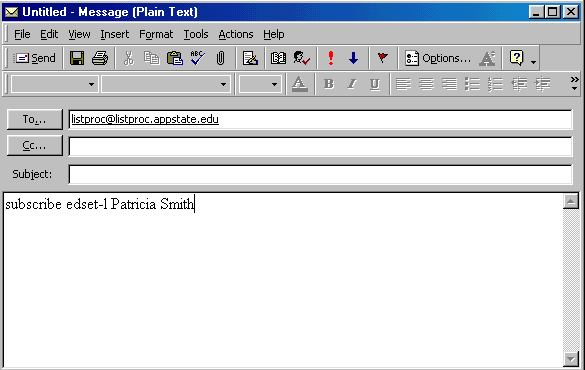
is is snowing in Boone and if your instructor has an important announcement to make, etc. In order to subscribe to the class listserve you must send an email message to the list processor at Appalachian State. The address is [email protected]. You do not need to put anything in the subject line but your message must be very exact. The message is going to a computer and it only understands specific commands. The message should read: subscribe "your_cohort's_list" "your_firstname" "your_lastname" Note: You need to substitute the correct name for your cohort's listserve for "your_cohort's_ list" and your name for "your_firstname" and "your_lastname." You should not have quote marks in the command you send.
See the example below: this example is for the listserve edset-l. Substitute the name of your cohort's list for edset-l and your name for Patricia Smith. |
| You should receive an email message informing you that
you have successfully subscribe to the appropriate listserve. Save this
message, since it will also include directions on how to unsubscribe from
the list. If you receive an email message informing you that your effort to subscribe was unsuccessful, forward the message to your instructor so he can help you get subscribed to the list. |