Registering for the Discussion Board
| This section of FDN 5220 uses a threaded discussion board
named FDN 5420, Hypermedia in Instruction. You can get to this board by going to
http://forums.lesn.appstate.edu and selecting the
FDN 5420, Hypermedia in Instruction board from the list or you can go directly to the board by using
http://forums.lesn.appstate.edu/default.asp?b=5. There are
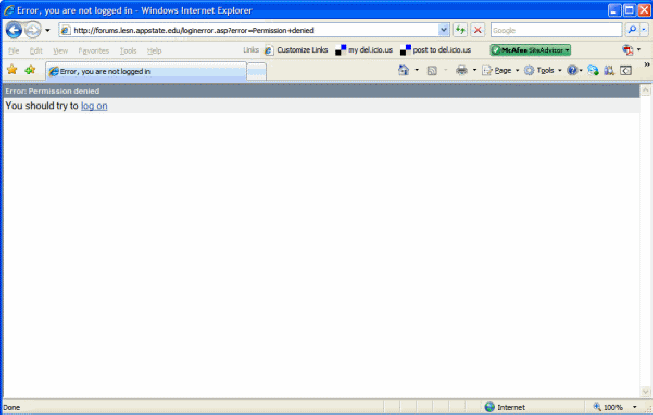
also links to this discussion board at the Sundial and throughout the class web pages. The discussion board has various topics on it. You will be asked to interact with your classmates and members of other class sections by making entries in these different conversations and by responding to the entries of others. Please engage with each other in a conversational way rather than just making statements. This should result in creating a number of "discussion threads". In order to access this discussion board you must register on it and then log on to the board. To register you need to go to the discussion board. You will get a screen that looks like the one below giving you an error message. Choose the Log on link. |
| Clicking on the Log On link
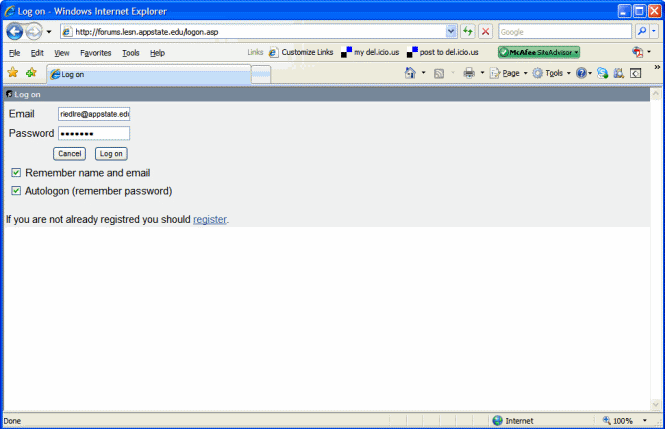
will give you the following page. Choose the Register link that
is at the at the bottom of the gray area of the screen (You cannot login
yet, you have to choose the Register option.).
You will then be asked to type in your name (first and last name), email address, and a password (typed in twice to make sure you didn't make a typing mistake). Your email address becomes your username for the system. |
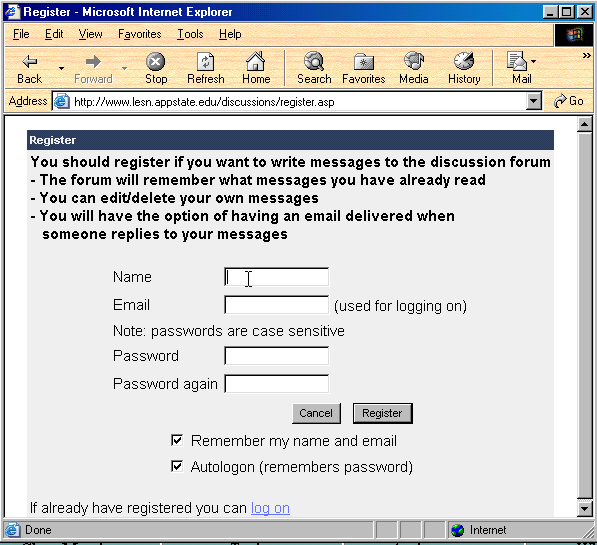
| If you are using a computer that is used by no one else you can check the "Remember my name and email" and the "Autologon" boxes (they are selected by default so you will have to uncheck them if you don't want these features to operate). Once you have registered you can log on to the discussion board and use all of its features. If you don't have the autologon feature turned on you will need to logon each time you go to the board to use it. |